Change your Password

 To
change your password, select the "Change Your Password" ICON on
the My Account page. To
change your password, select the "Change Your Password" ICON on
the My Account page.
 Type
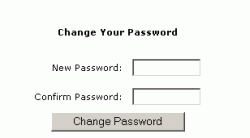
in a new password and click the Change Password button. Type
in a new password and click the Change Password button.
NOTE: Passwords are case sensitive.
What do you want to do?
Click here for the Main Help menu
|