Add a Photo to your Profile
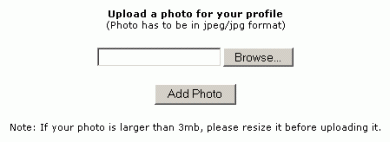
This must be a JPG file type, e.g. "myphoto.jpg" To upload a photo, click on the "Add a Photo for your profile" menu item in the My Account page. You will then see the form as shown below. Use the "Browse" button on this form to locate a picture on your local hard disk. Then click "Add Photo".
NOTE: Make sure you upload a photo that is less than 1MB. Anything larger will take a long time and also may fail to upload properly.
What do you want to do?
|
 You
may choose to upload a photo of yourself that other will see when
they view your profile in the Members Directory.
You
may choose to upload a photo of yourself that other will see when
they view your profile in the Members Directory.