Login FAQs

How do I know if I am Logged In?
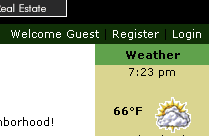 Check
the "welcome" message at the top of the page on the line
below the header (this may be on the left or the right hand side
of the page). Check
the "welcome" message at the top of the page on the line
below the header (this may be on the left or the right hand side
of the page).
This will display "Welcome Guest" if you are not logged
in.
If you are logged in, it will show your user ID. For example, if
you have a user-ID of "john", then this message will say
"Welcome john".
I am having problems logging in
- Remember your password is case sensitive, so 'Password'
is not the same as 'password'.
- If you need to reset your password, use the 'Forgot My Password'
link to reset your password. Click
here for more help
- Your system needs to be able to store cookies to enable you
to be logged in. Common problems that often cause this type of
cookie blocking include:
- Internet Explorer Privacy and Security Settings
set too high (default settings will be fine)
- Running spyware blockers or pop-up
blocker software may
prevent cookies from being accepted
- Other cookie blocking, cookie removal or ad-blocking
software can also interfere with the necessary process
of saving cookies when logging in.
- Using firewall software (e.g. ZONE
ALARM, or Norton Internet Security) where browsing privacy settings
are set too high and can often prevent cookies and other session
information to be stored correctly.
I am logged in but I cannot access any areas - all I see is ACCESS
DENIED messages
Check that you are actually logged in by looking at the "welcome"
message at the top of the page on the line below the header. This
will display "Welcome Guest" if you are not logged in.
If you are logged in, it will show your user ID. For example, if
you have a user-ID of "john", then this message will say
"Welcome john". Click
here for more.
What do you want to do?
Read the Login FAQs
Click here for the Main
Help menu |