Create a new discussion Topic

If you wish, you may choose to start a new TOPIC inside a specific
Forum.

- Click on the [New Topic] link which appears in the forum menu
or existing Topic menu.
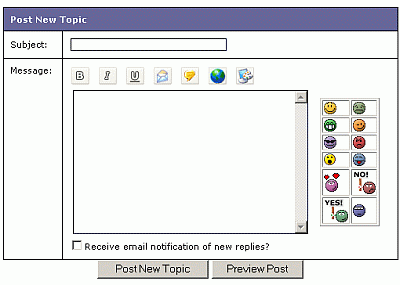
- Now fill in the "Post New Topic" form as shown below:
- type in
the Subject and the Message text.
- If you want you can add simple formatting using the icons at
the top for BOLD, UNDERLINE or ITALIC
- You can add 'smilies'. These are the faces in the panel to
the right. Ths allows you to add emotion or humor to your posts.
- You can request to recieve notifications if anyone replys to
your Topic by checking that box.
NOTE: We suggest that if you can, try to keep discussions related
to a general topic area within one topic thread to avoid fragmenting
discussions too much.
What do you want to do?
View a Forum?
Add to the conversation?
Start a new line of Conversation?
See Forum FAQs
Click here for the Main Help menu
|