Discussion Forums
Within your neighborhood site, there will be a number of Discussion Forums. For example, "Welcome to New Neighbors", "School News Exchange", "Neighborhood Announcements" and so on.
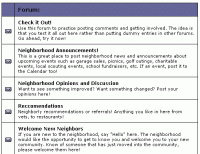
Note: If you would like a NEW Discussion Forum to be set up, this can be done easily by your site administrator. Please contact them. If you want to look at a specific Discussion Forum, just click on that Discussion to see the contents. Alternatively, if you click on the Main Menu item "Forums", you will see a page that lists all the Forums as shown below.
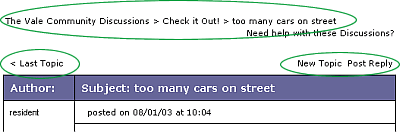
How a Discussion Forum WorksWithin your neighborhood site, there will be a number of Discussion Forums. A discussion forum is a place for people to discuss TOPICS of common interest that are all related to that specific Forum. For example, inside the "Neighborhood Announcements" Forum, there may be a number of TOPICS all being discussed, such as "Block Party", or "lost pets". Someone needs to start the discussion TOPIC inside a Forum. Then, once the discussion TOPIC has started, anyone can make REPLIES. The collection of REPLIES to a TOPIC is called a discussion THREAD. This is how discussions progress - members make a REPLY to an existing TOPIC inside a FORUM. So, in summary, each Discussion Forum is made up of TOPICS and each topic is made up of one or more REPLYs. Forum Menu and Getting AroundTo navigate around the Forum, use the links on the page that look similar to this:
What do you want to do?View a Forum?
|
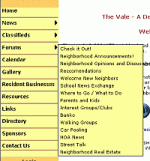 The
Forum pop-out menu will display all available Discussion Forums.
The
Forum pop-out menu will display all available Discussion Forums.